Guide
Software to manage a video editing agency
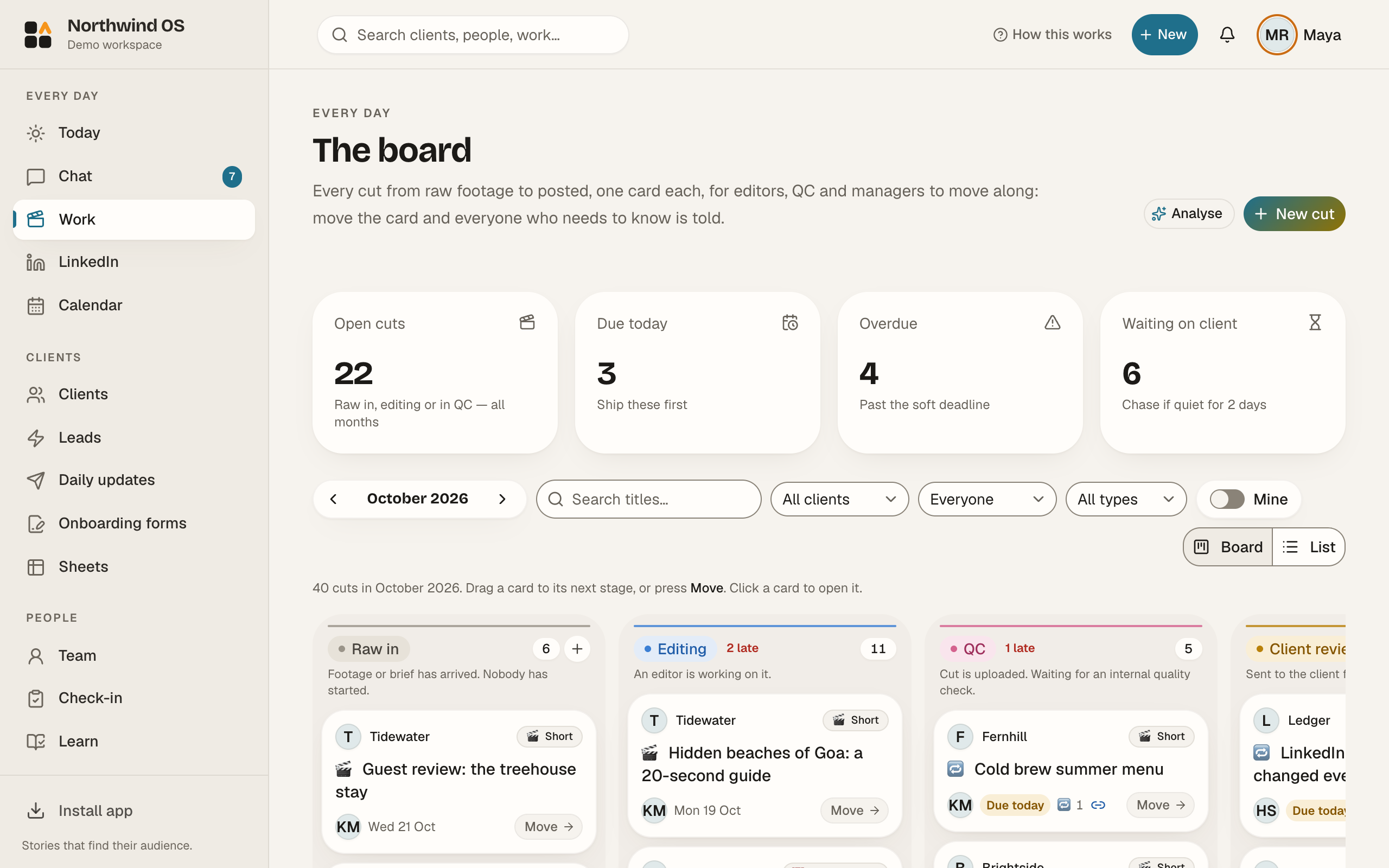
Pinnakle OS is software to run a video or content agency in one app. Every video moves through the same board, from raw footage to editing, QC, client review, approval and posted. Clients leave notes on the exact second of a cut without making an account. Each client also gets their own private space with a brand kit and reports. Pinnakle Media, a working video agency in India, built it for its own team first. Solo is free for one person with 3 clients, and team plans start at ₹999 a month in India ($19 elsewhere).
Key takeaways
- One app for the whole agency: work board, QC, client review links, chat, client portal, daily client updates and team reports.
- Clients review videos with timestamped notes. They don't need a login.
- Free Solo plan (1 seat, 3 clients). Starter ₹999, Studio ₹2,299 and Agency ₹5,999 a month in India ($19, $49 and $129 elsewhere) at launch prices, locked for 12 months.
- Every new workspace gets 14 days of Studio, no card needed.
- Client users are always free on paid plans.
What is video agency management software?
Video agency management software is a tool that tracks every client video from raw footage to posted, in one place. It replaces the mix of spreadsheets, chat groups, Drive folders and review tools that most editing agencies run on. A good one also shows clients their own work, so they stop asking “where is my video?”.
How does one video move through Pinnakle OS?
- 01
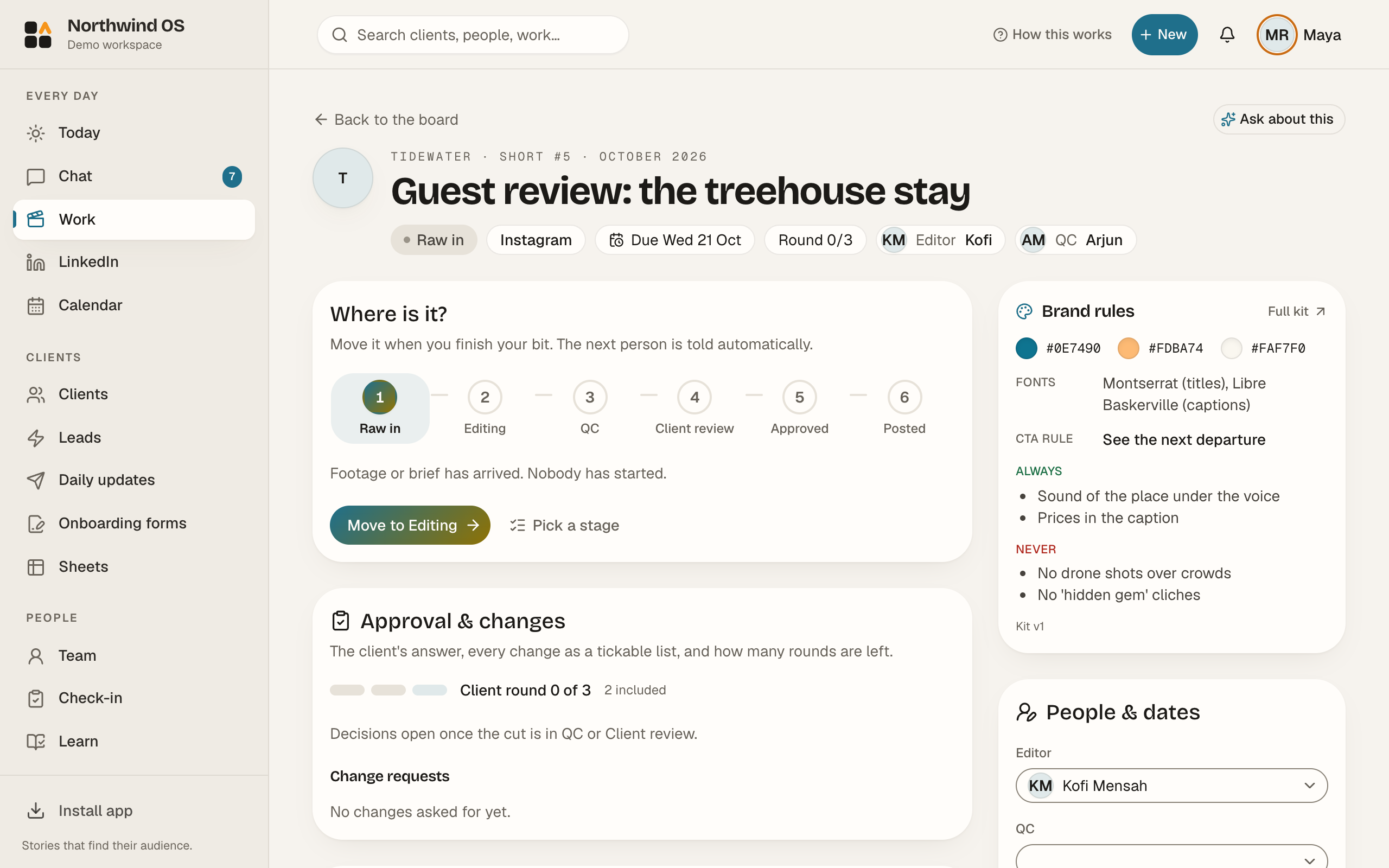
Raw in. The client or your team drops the brief or the footage into the client's space.
- 02
Editing. The video is assigned to an editor. It sits on the board with a due date.
- 03
QC. A second person checks it against the QC list before the client sees it.
- 04
Client review. You send one review link. The client watches, clicks on the exact second and types a note. No login.
- 05
Approved and posted. Approval is recorded with a date. The video moves to Posted, and the daily client update tells the client.
What's included?
| Area | What you get |
|---|---|
| Work board | Raw in → Editing → QC → Client review → Approved → Posted, for every client |
| Client review | Review links with timestamped notes, no client login, approval history |
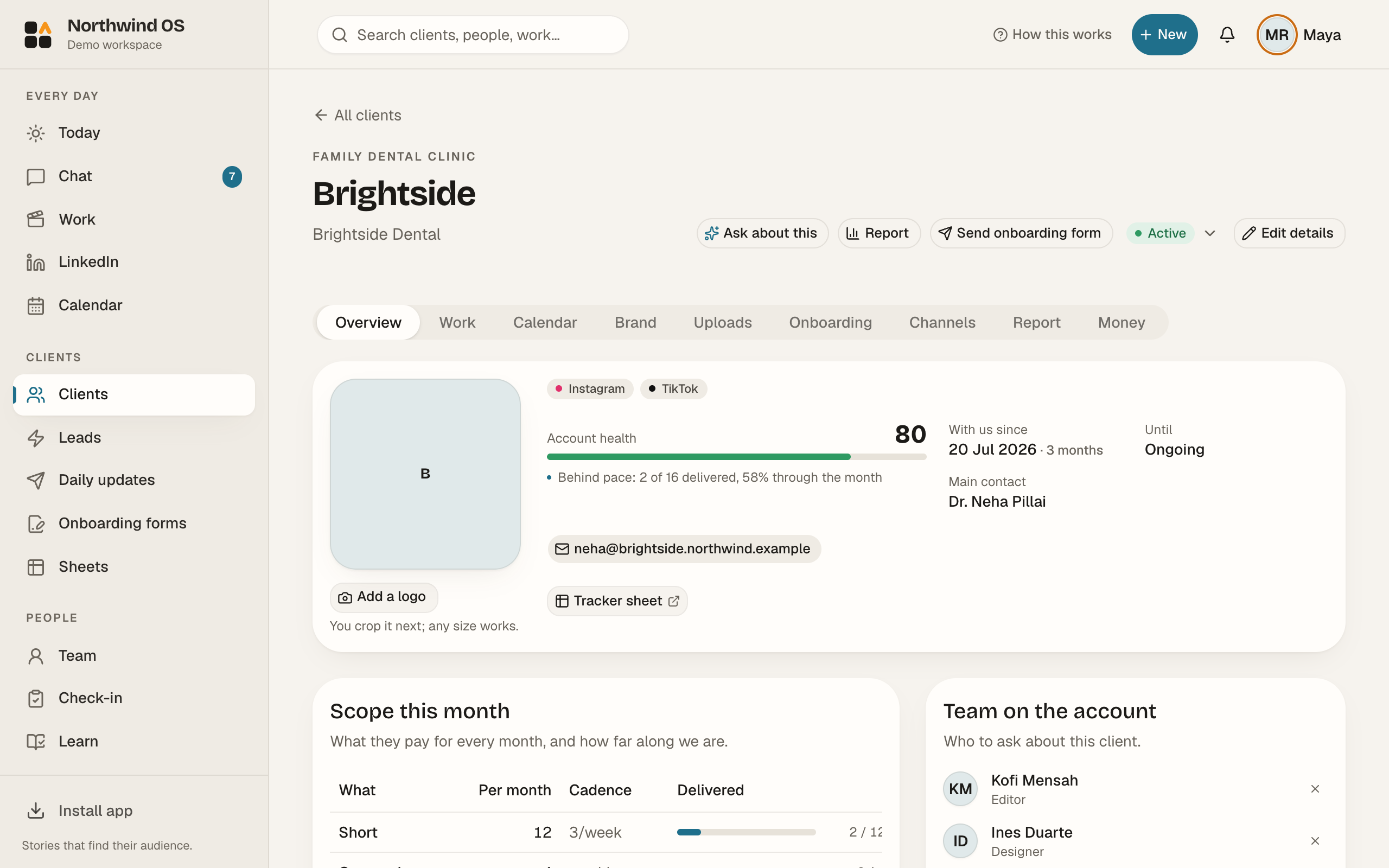
| Client portal | Each client gets a private space with their videos, brand kit and reports (Studio and up) |
| Team | Role dashboards, so each person opens the app and sees their own day. Team chat and check-ins. |
| Reports | Daily client updates and team reports |
| AI | AI credits each month (25 on Solo up to 1,000 on Agency) |
| Security | Every workspace is kept separate. Credentials vault. Client locks are on by default. |
How does Pinnakle OS compare with other tools?
| Pinnakle OS | ManyRequests | Frame.io | ClickUp | |
|---|---|---|---|---|
| Made for | Video and content agencies | Productised service agencies | Video review | General project work |
| Start price | Free (Solo); ₹999/mo in India, $19/mo elsewhere (Starter, 5 seats) | $99/mo (2 seats) | $15/user/mo | $7/user/mo |
| Work board with video stages and QC | Built in | Request board | No | You build it yourself |
| Timestamped client review | Yes, no client login | File feedback | Yes (its main strength) | No |
| Client portal | Yes (Studio and up) | Yes | No | Limited |
| Best at | Running the whole agency in one place | Client requests and billing | Frame-accurate review for post-production teams | Any kind of project, highly flexible |
Prices are from each tool's own site, checked on 20 Oct 2026. They may change.
Is there free software to manage a video editing agency?
Yes. The Pinnakle OS Solo plan is free forever for one person with up to 3 clients. It includes 25 AI credits a month and 1 GB of storage, and needs no card. When you add editors or more clients, Starter (₹999 a month in India ($19 elsewhere)) gives you 5 seats and 10 clients.
Who is Pinnakle OS not for?
- Film and TV productions that need shot lists, call sheets and on-set planning. A tool like StudioBinder fits that better.
- Post houses that only need frame-accurate review. Frame.io is deeper on review alone.
- Teams that need SSO on day one. That is only on the Enterprise plan (50+ seats). Talk to us.
Who built it?
Pinnakle OS is built by PKJMB Media Private Limited, the company behind Pinnakle Media. Pinnakle Media is a video and personal branding agency run by Jayanth M B (Founder & CEO) and Prateek Kumar Tiwari (Co-founder & MD). The team built the app to run its own client work, then opened it to other agencies. Version 1.0 shipped in Sep 2026 and version 3.1 in Oct 2026 (see the release notes and the changelog).
FAQ
What is the best software to manage a video editing agency?
It depends on your size. For a small or growing agency that wants the work board, client review and client portal in one place, Pinnakle OS is built for exactly that. It's free for one person and ₹999 a month in India ($19 elsewhere) for a team of 5.
Is Pinnakle OS free?
Yes. The Solo plan is free forever for one person and up to 3 clients. Paid plans start at ₹999 a month in India ($19 elsewhere).
Do my clients need an account to review videos?
No. You send a review link. They leave notes on the exact second without logging in.
Do clients count as paid seats?
No. Client users are always free on paid plans.
Is there a free trial of the team plans?
Yes. Every new workspace gets 14 days of the Studio plan, no card needed.
Can I use my own brand?
Starter and Studio show your logo on the workspace. Agency adds full white-label and a custom domain.
Try it on your next video.
Solo is free for one person. Every new workspace gets 14 days of Studio, no card needed.